ElasticSearch domain in VPC
사전정보
- AWS에서 SaaS 형태로 제공하는 ElasticSearch(이하 ES)의 경우 domain을 VPC내부 또는 외부에 생성할 수 있다
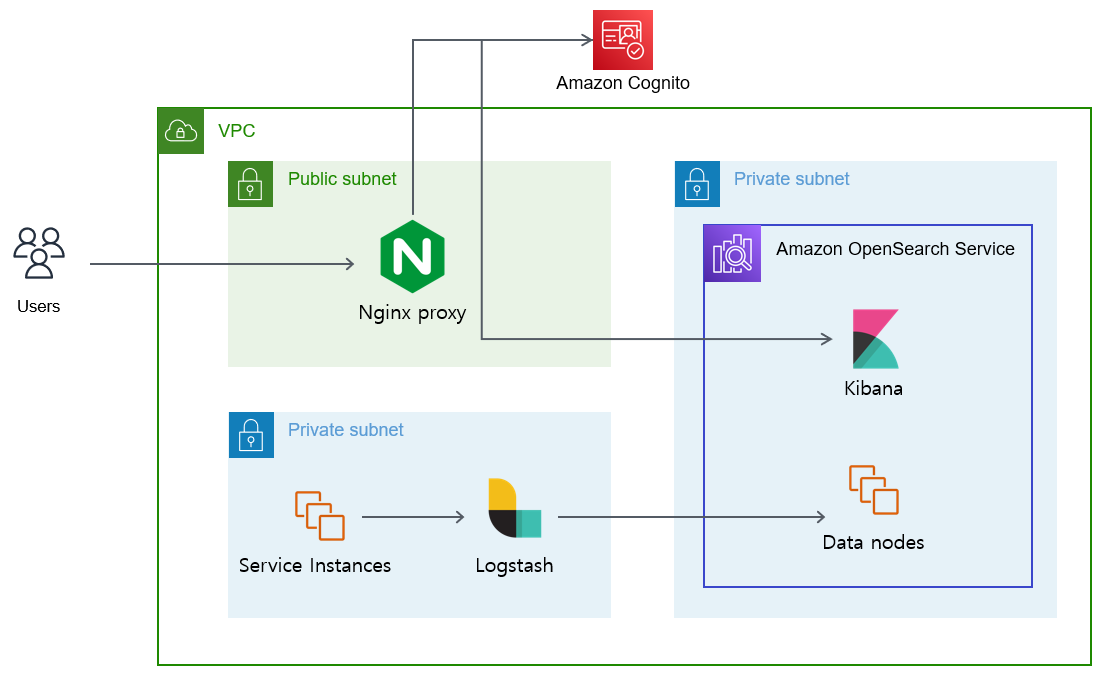
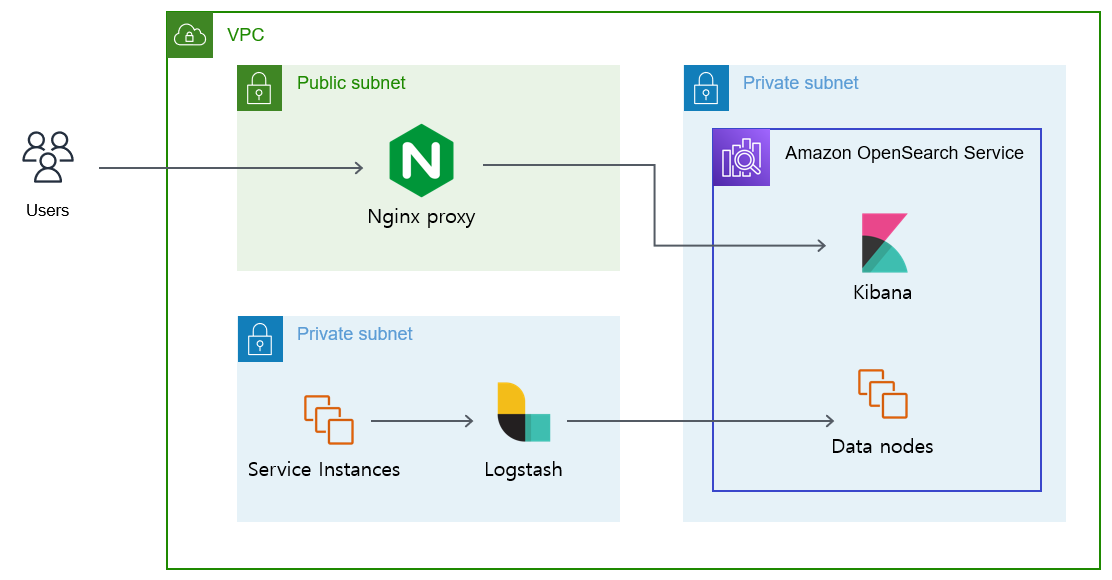
- 보안을 위해 VPC 내부에 생성을 권고하는데, ES domain이 private subnet에 위치하는 경우 public subnet에 Nginx를 프록시 서버로 생성하고 redirection 해주어야 한다
- Redirection시 cognito를 이용한 사용자인증 유무에 따라 Nginx 설정이 다르다(아래 참조)
-
Nginx proxy config
참고: ssl on; 지시어는 최신 nginx에서 제거되었고 TLSv1/TLSv1.1도 폐기되었으니, 지금은 listen 443 ssl;과 ssl_protocols TLSv1.2 TLSv1.3; 형태를 사용한다 (아래는 작성 시점 AWS 템플릿 인용)
- Cognito를 사용하는 경우
| /etc/nginx/conf.d/default.conf |
|---|
| server {
listen 443;
server_name $host;
rewrite ^/$ https://$host/_dashboards redirect;
resolver 10.0.0.2 ipv6=off valid=5s;
set $domain_endpoint my_domain_host;
set $cognito_host my_cognito_host;
ssl_certificate /etc/nginx/cert.crt;
ssl_certificate_key /etc/nginx/cert.key;
ssl on;
ssl_session_cache builtin:1000 shared:SSL:10m;
ssl_protocols TLSv1 TLSv1.1 TLSv1.2;
ssl_ciphers HIGH:!aNULL:!eNULL:!EXPORT:!CAMELLIA:!DES:!MD5:!PSK:!RC4;
ssl_prefer_server_ciphers on;
location ^~ /_dashboards {
# Forward requests to Dashboards
proxy_pass https://$domain_endpoint;
# Handle redirects to Cognito
proxy_redirect https://$cognito_host https://$host;
# Handle redirects to Dashboards
proxy_redirect https://$domain_endpoint https://$host;
# Update cookie domain and path
proxy_cookie_domain $domain_endpoint $host;
proxy_cookie_path ~*^/$ /_dashboards/;
# Response buffer settings
proxy_buffer_size 128k;
proxy_buffers 4 256k;
proxy_busy_buffers_size 256k;
}
location ~ \/(log|sign|fav|forgot|change|saml|oauth2|confirm) {
# Forward requests to Cognito
proxy_pass https://$cognito_host;
# Handle redirects to Dashboards
proxy_redirect https://$domain_endpoint https://$host;
# Handle redirects to Cognito
proxy_redirect https://$cognito_host https://$host;
proxy_cookie_domain $cognito_host $host;
}
}
|
sudo sed -i 's/my_domain_host/vpc-cognito-private-xxxxxxxxxx.us-east-1.es.amazonaws.com/' /etc/nginx/conf.d/default.conf
sudo sed -i 's/my_cognito_host/dean-kumo-xxxxxxx.auth.us-east-1.amazoncognito.com/' /etc/nginx/conf.d/default.conf
- Cognito를 사용하지 않는 경우
| /etc/nginx/conf.d/default.conf |
|---|
| server { # kibana domain
listen 443;
server_name $hostname;
rewrite ^/$ https://$host/_plugin/kibana redirect;
set $domain_endpoint my_domain_host;
ssl_certificate /etc/nginx/cert.crt;
ssl_certificate_key /etc/nginx/cert.key;
ssl on;
ssl_session_cache builtin:1000 shared:SSL:10m;
ssl_protocols TLSv1 TLSv1.1 TLSv1.2;
ssl_ciphers HIGH:!aNULL:!eNULL:!EXPORT:!CAMELLIA:!DES:!MD5:!PSK:!RC4;
ssl_prefer_server_ciphers on;
location ^~ /_plugin/kibana {
# Forward requests to Kibana
proxy_pass https://$domain_endpoint/_plugin/kibana;
proxy_set_header Accept-Encoding "";
sub_filter_types *;
sub_filter $domain_endpoint $host;
sub_filter_once off;
# Response buffer settings
proxy_buffer_size 128k;
proxy_buffers 8 1024k;
proxy_busy_buffers_size 1024k;
proxy_read_timeout 300s;
proxy_connect_timeout 75s;
proxy_ignore_headers Cache-Control;
add_header X-Proxy-Cache $upstream_cache_status;
add_header Cache-Control "public";
}
}
|
-
AWS Lambda in VPC + API Gateway를 활용하는 방법
출처:
1. Nginx ES-Prowy with EC2
2. AWS Lambda in VPC + API Gateway